Every few years someone in a small plant sits through a demo of an advanced planning and scheduling system. The screen shows every job on every machine, color-coded, re-optimized in seconds when an order changes. It's impressive. It's also usually the wrong answer for a plant of a hundred people.
Not because optimization is bad, but because most small plants have more basic planning problems to solve first, and an optimizer built on bad inputs produces confident, precise, wrong schedules.
What actually goes wrong in small-plant planning
When schedules fail in small plants, the cause is rarely a lack of optimization. It's usually one of these:
- The plan assumes capacity that isn't there. Machines are scheduled at 100% with no allowance for setups, breakdowns or the operator who's out sick.
- Material isn't really available. The ERP says the parts are on hand. They're on hand, but at the wrong revision, in quarantine, or in the wrong building.
- Routings are fiction. Standard times were set years ago and nobody has checked them against what the floor actually does.
- The schedule changes faster than anyone can communicate it. By the time the printed schedule reaches the floor, two priorities have changed.
- Nobody knows what's really late until it's too late. Status lives in people's heads, so problems surface at the shipping dock.
An APS doesn't fix any of these. It depends on all of them being fixed already.
The four things a small plant needs
In my experience, a small plant gets most of the value of good planning from four capabilities, none of which require an optimizer.
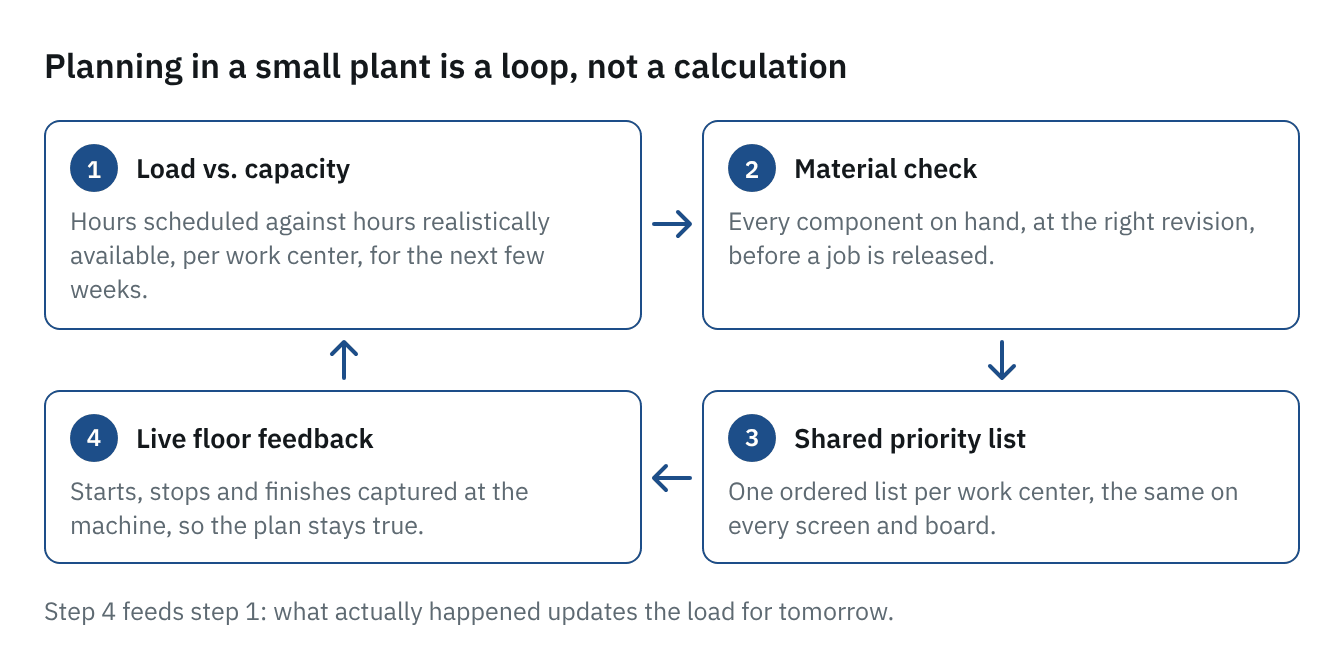
1. An honest load-versus-capacity view. For each work center, for the next few weeks: how many hours of work are scheduled, against how many hours are realistically available. A simple chart that shows overloaded weeks in red will drive better decisions than a detailed Gantt chart nobody believes.
2. Material that's checked before a job is released. Before work goes to the floor, confirm that every component is actually available, at the right revision, where it needs to be. Releasing jobs that can't be finished is one of the biggest sources of work-in-process and chaos.
3. A shared priority list for each work center. Each cell or machine needs one list, in order, that everyone sees: what's next, what's after that. The list should be the same on the supervisor's screen, the operator's screen and the board on the wall.
4. Feedback from the floor. When a job starts, stops or finishes, the plan needs to know. Without that, the schedule drifts away from reality within a day. This is where shop-floor data capture and planning meet.
The diagram shows how the four fit together. Read it clockwise from the top left: check load against capacity, confirm material before release, publish one priority list, and capture what actually happens at the machine. The last step feeds the first, because what happened today changes tomorrow's load. Step 4 is the one most small plants are missing, and without it the loop breaks and the plan drifts away from reality within a day.
Get the inputs right first
Before any planning tool can help, a few inputs have to be trustworthy.
- Routings and standard times that reflect current reality, at least for the work centers that constrain the plant.
- Inventory accuracy good enough that "on hand" means on hand.
- Realistic capacity for each constraint, including setups and typical downtime.
- Lead times from suppliers that match what they actually deliver, not what's on the quote.
None of this is exciting work. All of it pays back regardless of the software you end up using.
Know your constraint
Most plants have one or two work centers that set the pace for everything else. Planning effort spent anywhere else has limited value. Identify the constraint, protect it with buffers so it never starves, schedule everything else to support it, and measure its output every day.
That one idea, borrowed from the theory of constraints, often does more for on-time delivery than a full scheduling system.
When an APS does make sense
There is a point where an optimizer earns its keep: many machines with sequence-dependent setups, complex alternate routings, tight shared resources like tooling or skilled labor, and a high volume of schedule changes. If your planner is genuinely spending all day re-sequencing and the inputs above are already solid, the time may be right.
For most small plants, though, the path is the opposite of the demo: get the basics right, make status visible, and close the loop with the floor. Then decide whether optimization is worth adding.
A quick self-check
Can you answer these in under five minutes, without asking anyone?
- Which work center is overloaded in the next two weeks?
- Which released jobs are waiting on material?
- What is each cell supposed to run next?
- Which orders are at risk of shipping late this week?
If not, those four answers are your planning system's requirements, and they're a much better place to start than an optimizer.