Most small plants facing a software decision see two doors. Behind one is a large package built for a bigger company: expensive, slow to implement, and shaped around someone else's plant. Behind the other is the homegrown tool: a spreadsheet, a database or a small app that someone capable on staff puts together.
I've been through both doors. I've sat through the six-figure implementations, and I've built tools myself when nothing on the market fit. Both taught me the same thing: neither is the right answer for most of what a small plant needs. There is a third door, and it's where I think most plants should be looking.
Why the big package often disappoints
For the core of the business, buying a proven package is right. General ledger, payroll, invoicing and the basic order-to-cash flow in an ERP are solved problems, and nobody wins customers with homegrown accounting.
The trouble starts when the same approach is applied to the shop floor, maintenance and spare-parts purchasing. Those processes are different in every plant, and they change often. A large package forces the plant to work the way the software expects, every change becomes a services request, and the people on the floor end up working for the system instead of the other way around. Many plants quietly go back to their spreadsheets within a year.
Why building your own is a trap
When the package doesn't fit, building looks attractive. The first version is fast and cheap, it fits the plant perfectly, and the people who use it like it. I understand the appeal. I've done it.
But the cost of a homegrown tool isn't the first version. It's everything after:
- It depends on one person. Whoever built it is the only one who understands it. When they're busy, on vacation or gone, the tool stops evolving, or stops working.
- Nobody supports it. When it breaks at 2 a.m., there's no help desk. There's whoever answers their phone.
- It doesn't connect. Homegrown tools rarely talk to the ERP properly, so someone re-keys data every day, and eventually stops.
- It never gets the investment it needs. Security, backups, user permissions, mobile screens and reporting all get postponed, because the plant's real job is making parts, not maintaining software.
- It doesn't scale. What works for one cell and one shift starts to crack with a second building or a third shift.
The plant ends up trading the original problem for a new one: a business-critical system with no owner. Talented people inside a plant should be improving the operation, not maintaining code.
The third option: configure
The better answer for the shop floor, maintenance and spare parts is software that's built for small plants and that the plant configures itself. It combines what people like about homegrown tools with what they need from a vendor:
- It fits like something you built, because you set it up in your own terms: your machines, your reason codes, your job steps, your approval rules.
- It changes as fast as you do, because changing a reason code or adding a machine is a setting, not a services contract.
- It's maintained like something you bought: supported, secured, backed up, updated and connected to your ERP, without depending on one person.
- It's priced for the problem you have, in modules, rather than as an enterprise suite.
Deciding which processes need which approach
Two questions sort almost every process: how specific is it to your plant, and how often does it change?
Read the grid below by placing a process on each axis. The further up, the more it's unique to your plant. The further right, the more often it changes. Processes in the bottom row are well served by standard packages. Processes in the top-right, unique to your plant and constantly changing, are exactly where large packages fit worst and homegrown tools become liabilities. That corner is what configurable software is for.
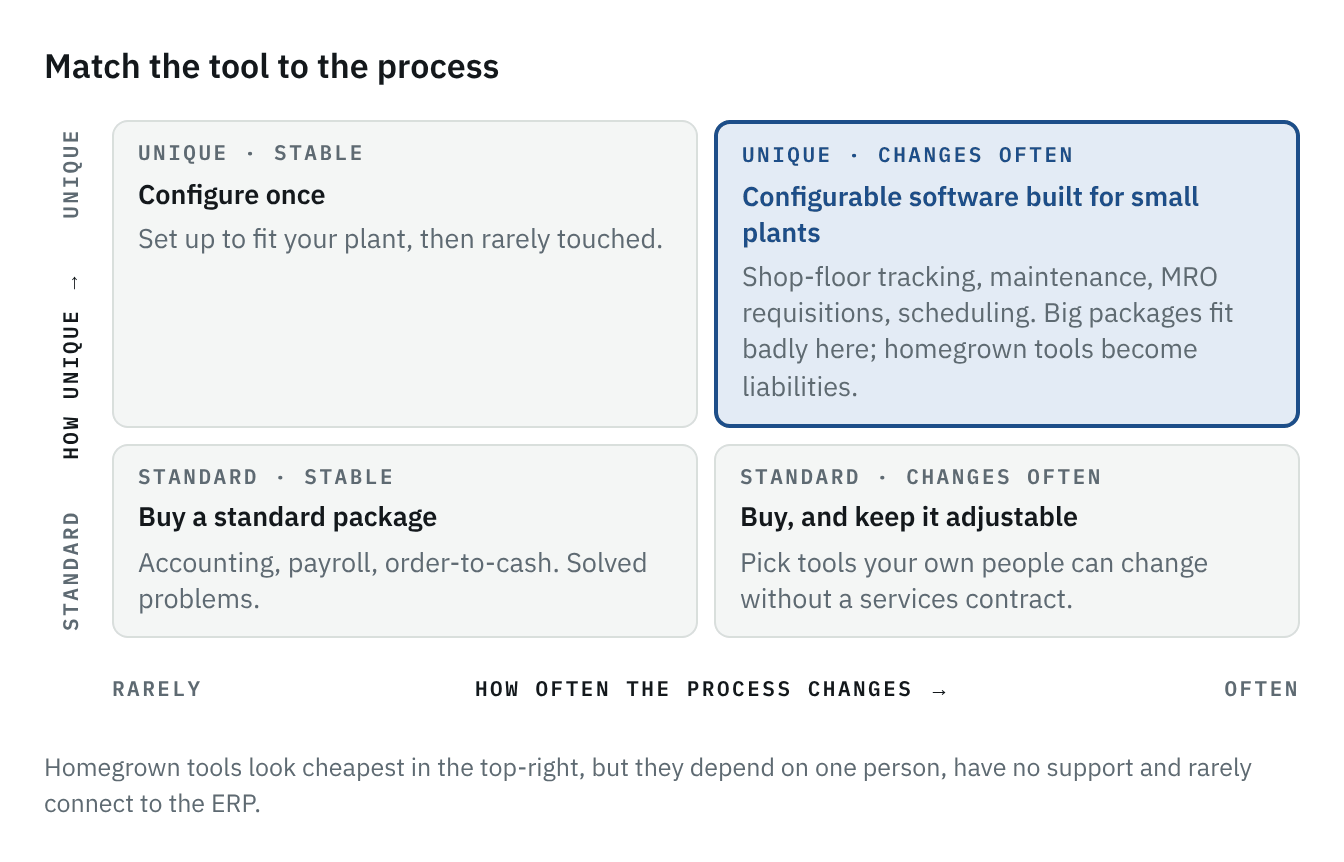
For most small plants, the top-right holds shop-floor tracking, maintenance requests, spare-parts and MRO requisitions, scheduling boards and the reports that tie them together. Those are the processes that drive most of the daily friction, and the ones where the choice of tool matters most.
Four questions before you choose
When a process is causing pain and someone proposes a software fix, ask these in order.
- Is this a solved problem everywhere else? If every company like yours does it the same way, buy a standard package.
- Does it change more than a couple of times a year? If yes, you need something your own people can change without a services contract.
- Will the people doing the work use it at the moment the work happens? If it depends on a long form or a desk, no tool will work until that's fixed.
- Could it keep running if the person who set it up left tomorrow? If not, you're building a dependency, not a system.
What I'd do first
Pick the one process that eats the most time in re-typing, chasing and reconciling. Map it on one page: who touches it, what they need to know, and when. Then run it through the four questions. For most small plants, that first process lands in the top-right corner, and the right next step is neither a big package nor a weekend project, but a tool built for exactly that problem that the plant can shape itself.