An MES your operators avoid is just an expensive whiteboard. The plants that get real value from shop-floor software aren't the ones with the most features. They're the ones whose people actually use it, every job, every shift.
Your ERP stops at the office door
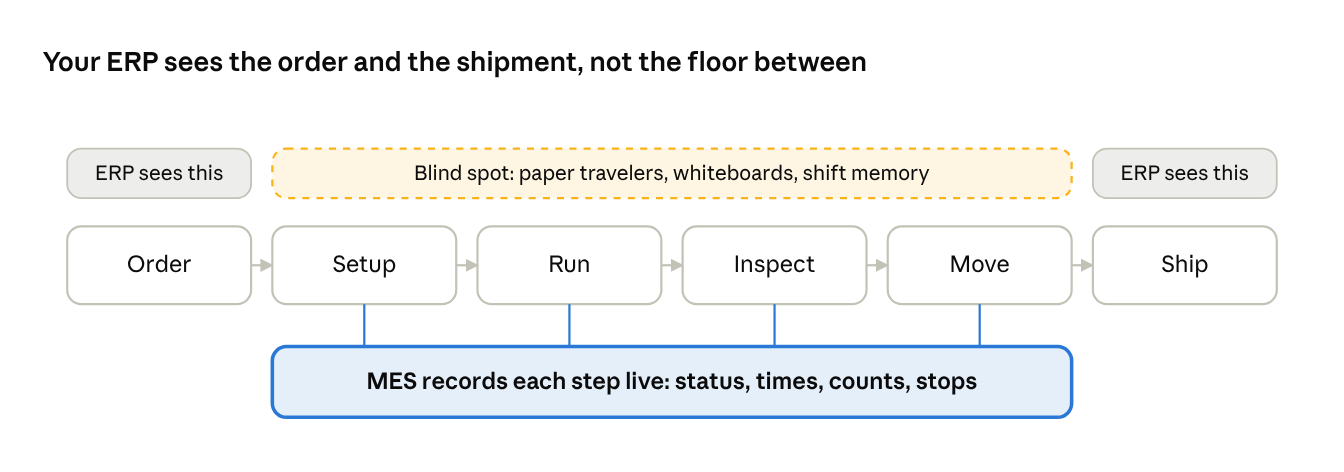
In most small and mid-sized plants, the ERP knows what was ordered, what was shipped and what was invoiced. It knows very little about what happened in between.
On the floor, the real record is still a paper traveler, a whiteboard by the cell and whatever the second-shift lead remembers to pass along. By the time a supervisor learns a job is behind, the day it could have been saved has already passed.
A manufacturing execution system (MES) closes that gap. It captures what is actually happening at each machine and each operation, as it happens. Done well, it turns the shop floor from something you reconstruct after the fact into something you can see and steer.
What an effective MES actually gives you
The value of an MES is not the software. It is the decisions people can make sooner because the information is in front of them.
- Ahead or behind, right now. Every job and every work center shows its status against plan during the shift, not in tomorrow's report. Supervisors spend their time fixing problems instead of finding them.
- Actual process times, not estimates. Most routings carry standard times that someone set years ago. An MES records what each operation really takes, which corrects your quotes, your capacity plan and your delivery promises.
- Downtime with a reason attached. When a machine stops, the system asks why. A month of coded reasons shows whether the real problem is setups, material, tooling or maintenance, so improvement money goes where it pays back.
- Traceability without the paperwork chase. Who ran the part, on which machine, from which material lot, with which inspection results. When a customer calls with a problem, you answer in minutes instead of days.
- One version of the truth. Planning, the floor and the front office stop arguing over whose spreadsheet is right, because everyone is looking at the same live data.
None of these benefits requires a large plant. A 40-person job shop feels a late order or an untraceable defect just as sharply as a 4,000-person one, and has less margin to absorb it.
Why MES projects fail: adoption, not features
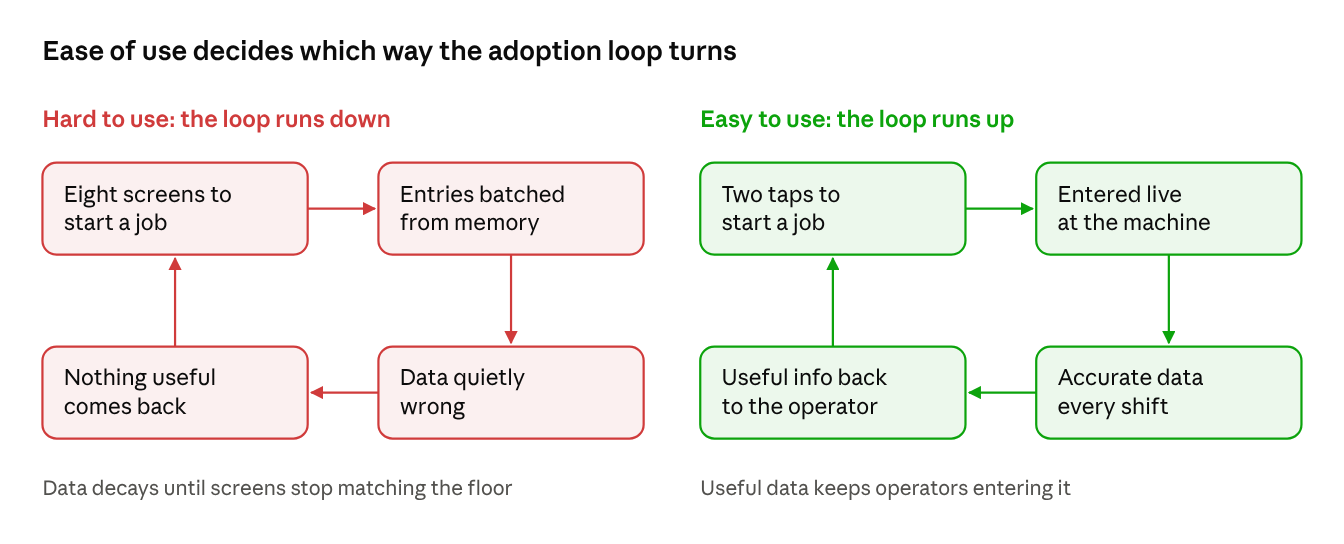
Every one of those benefits depends on one thing: operators entering accurate data, every job, every shift. When they stop, the MES goes quiet, and a quiet MES is worse than none. Management keeps trusting screens that no longer match the floor.
MES rollouts rarely fail on functionality. They usually fail early, in the first weeks on the floor, when operators decide the system is more trouble than it is worth. The pattern is familiar:
- Too many taps to do a simple thing. If starting a job takes eight screens, operators batch their entries at the end of the shift, from memory. The data looks complete and is quietly wrong.
- Built for the office, used on the floor. Small fonts, dense grids and a mouse don't survive gloves, coolant, noise and a 10-inch screen mounted on a machine.
- It feels like surveillance. When the first thing an operator sees is a ranking, the system becomes something to work around instead of a tool that helps them.
- Nothing comes back to the operator. If people only ever feed the system and never get anything useful from it, compliance turns into box-ticking.
- Training as a one-time event. A two-hour class before go-live does not cover the new hire who starts six months later on second shift.
The lesson is that ease of use is not a nice-to-have feature. It is the condition that makes every other feature work.
What ease of use means on a shop floor
Ease of use on the floor is different from ease of use at a desk. A good test: could a new operator on second shift use it correctly on day one, with no one to ask?
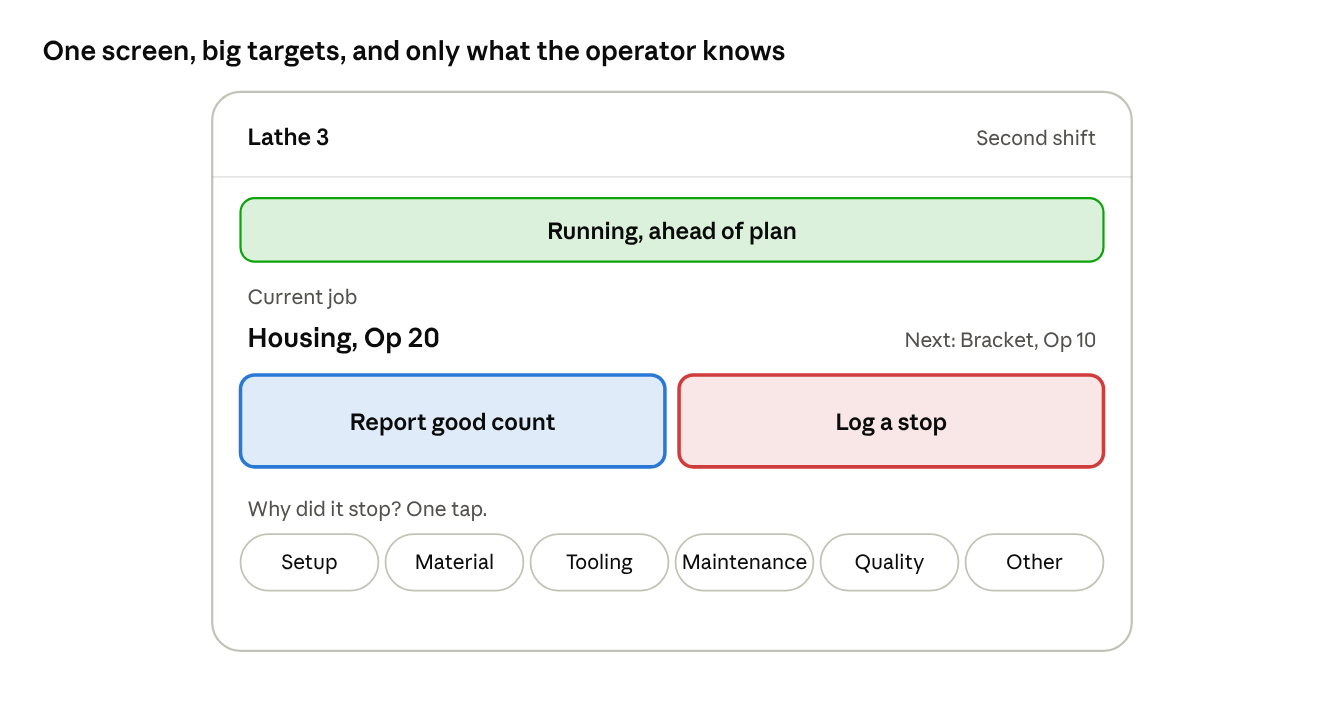
- Two taps to start or stop a job. Scan the traveler or tap the job at the top of the machine's queue, confirm, done. Every additional step is a reason to skip it.
- Big targets, high contrast, readable at arm's length. Designed for a touchscreen on a machine, used with gloves under shop lighting.
- The system remembers, so the operator doesn't have to. The machine, the shift, the next job in sequence and the routing step should already be filled in. Ask only for what only the operator knows: good count, scrap and a reason.
- Downtime reasons as a short, plain list. Six to ten reasons in the shop's own words beat a 60-item code tree that nobody reads.
- Color means state, nothing else. Green, amber and red should mean running, at risk and stopped, consistently on every screen. When color is also used for decoration, operators stop trusting it.
- Something useful comes back. Show operators their own job's progress, the next job and what they need for it, and how the cell is tracking against the shift. People keep feeding a system that helps them.
- Coaching, not ranking. Use performance data to find training gaps and support people. A system seen as a scoreboard loses the honest data it depends on.
- Forgiving of mistakes. A wrong entry should be easy to correct on the spot, with a record kept, rather than locked until a supervisor fixes it.
How to judge adoption before you buy
Vendor demos are run by experts at a desk. Your operators will use the system at a machine, mid-shift, without help. Test for that instead:
- Put it in front of an operator, not a manager. Hand a tablet to someone from the floor, give no training, and ask them to start a job, report scrap and log a stop. Time it and watch where they hesitate.
- Count the taps. Count the steps for the five things operators do most: start a job, stop a job, record a count, log downtime, call for help. More than three for any of them is a warning.
- Try it at the machine. Use the actual screen size and mounting position, with gloves on and the floor noise around you.
- Ask what the operator gets back. If the vendor can only show supervisor dashboards, the system is built to extract data, not to help the people entering it.
- Check how fast you can change it. Can you rename a downtime reason or add a step in minutes, without a services contract? Your floor will change, and the system has to keep up.
- Ask for a short pilot on one cell. Two to four weeks on a real cell, with real operators, tells you more than any reference call. Measure how complete the data is at the end of each shift.
The business case starts with the operator
The returns from an MES, such as on-time delivery, better quotes, less downtime and faster answers to quality problems, are real. They all depend on data the operator chooses to enter accurately, shift after shift.
So when you evaluate an MES, judge it the way your operators will. Can a new hire use it on day one, and does it give them something back? A system that passes that test will keep collecting good data long after go-live, and that data is what pays for the system.